Security
xlwings Lite runs Python code inside the browser’s sandbox, so unlike VBA macros, it has no direct access to your operating system. On top of that, code that comes from a workbook only runs after you’ve approved it. This page explains which safeguards xlwings Lite uses and what risks you’re still exposed to.
For business-critical use, self-hosting puts the add-in, Python runtime, and packages on infrastructure you own.
Trust prompt
Whenever you open a workbook that contains Python code, xlwings Lite asks you whether you trust the authors of that workbook before it runs anything:
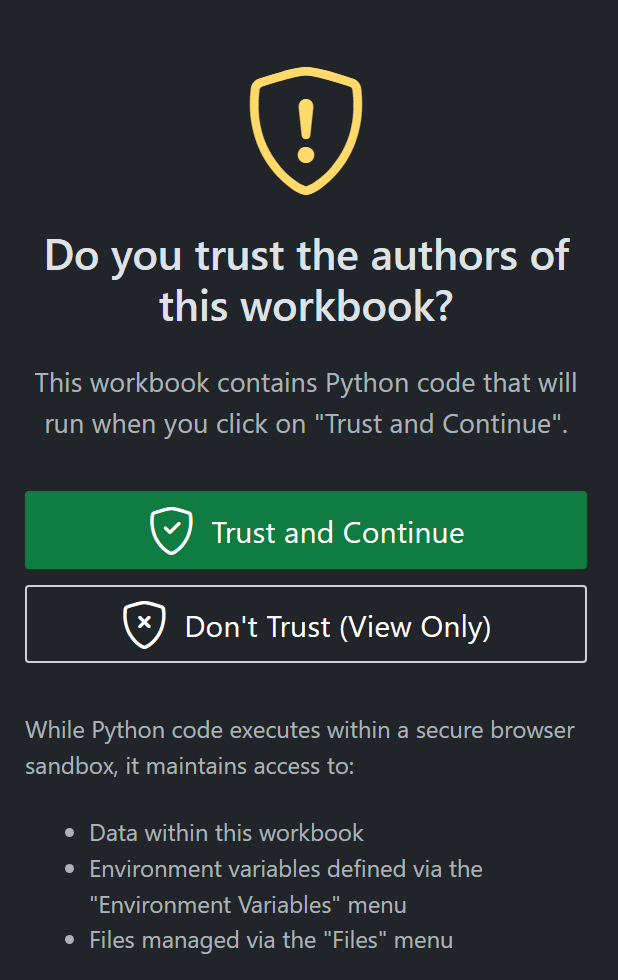
You have two options:
Trust and Continue: The code is loaded and potentially runs automatically. xlwings Lite remembers your choice for this workbook, so you won’t be asked again—unless the code changes, see below.
Don’t Trust (View Only): The code is shown in a read-only editor so you can inspect it, but nothing is executed. To run it, reload the add-in and choose Trust and Continue. In App Mode, this option is only shown after hitting Ctrl+Shift+M (Windows) or Cmd+Shift+M (macOS).
You’ll be prompted again if:
Someone else changes the workbook’s code
The Office cache is cleared
An xlwings Lite update requires it
Local browser storage
The following data is stored unencrypted in your browser’s local storage:
Local environment variables
Local settings (this includes e.g., API keys for AI providers)
Workbook trust decisions
Wingman chat history, which can include prompts, responses, and previous or applied source code
Local storage is isolated by the browser’s origin security model, so unrelated websites and other Office add-ins cannot access this data. Environment variables and settings with workbook scope are not stored here, see Workbook-scoped environment variables and settings.
Files managed through Files > Import/Export are stored separately in the browser’s IndexedDB storage, also unencrypted. On supported versions of desktop Excel for Windows, xlwings Lite also stores handles for folders you mount through Files > Local Folders. The browser may require you to grant access again, but a mounted folder gives trusted workbook code read and write access to that folder. Mounts are available across workbooks, so share only the smallest folder your code needs. See Files.
This isolation does not, however, protect against the following:
Workbook code: Once trusted, code in a workbook runs under the same origin and can therefore read the data listed above, along with any folders you’ve mounted—and could send it over the network.
Compromised add-in code: Malicious code introduced through Cross-Site Scripting (XSS), a compromised dependency, a compromised CDN, or a compromise of the xlwings Lite source repository or build pipeline could access browser storage. xlwings Lite reduces this risk with a restrictive Content Security Policy (CSP), Subresource Integrity (SRI) verification when loading the Pyodide runtime, and GitHub Dependabot alerts for known vulnerable dependencies. These measures reduce, but do not eliminate, the risk.
Local account access: Anyone with access to your operating-system account or browser profile could inspect local storage.
Consider using low‑privilege, rotatable API keys and setting spending limits on LLM providers (e.g., OpenAI) to reduce potential impact.
Workbook-scoped environment variables and settings
Environment variables and settings can also be given workbook scope, in which case they are stored unencrypted inside the Excel workbook itself rather than in your browser’s local storage.
Workbook-scoped values travel with the file. If you email the workbook, upload it to SharePoint, or commit it to a Git repository, everyone with access to that file also gets these values. Never store API keys, passwords, or connection strings with workbook scope in files you share.
Workbook scope is a good fit for values that aren’t secret but belong to the workbook, e.g., a base URL, a region, or a report name. For secrets, use local scope so that each user provides their own value on their own machine.
Internet access
Python runs on the end user’s computer, so direct network requests originate from that machine and go through the same network path as other browser traffic from that computer. This means they are subject to your existing corporate network controls—HTTP proxies, TLS-inspecting gateways, firewalls, and egress filtering or allowlists all apply automatically, and requests show up in the same logs.
Markdown cells can load images from external HTTPS URLs when you run them. The request originates from your computer, so the image host can see connection metadata such as your IP address. xlwings Lite sets a no-referrer policy on these images, so the image host does not receive the add-in’s URL. Use images from data URIs if you don’t want to contact an external host.
Python packages
Packages installed from requirements.txt execute with the same capabilities as the rest of the trusted workbook code. Only install packages from sources you trust.
requirements-pinned.txt requires Pyodide 314.0.0+ and records package names and versions, but not wheel URLs or cryptographic hashes. Pinning makes dependency resolution more reproducible, but it does not verify the exact package artifact that was downloaded. The trust prompt covers changes to requirements.txt and requirements-pinned.txt; it cannot detect a package registry serving different bytes for an unchanged requirement.
For higher-assurance deployments, use an audited internal package registry or mirror (e.g., Azure Artifacts) and disable direct public-PyPI access (this requires self-hosting).
Wingman
Wingman, the xlwings Lite AI assistant, sends your prompt, conversation context, and relevant source-code context from the editor to the AI provider and base URL you configured. The request also includes the API key for that provider. Review the provider’s data-handling and retention terms, use low-privilege and rotatable keys, and only configure custom base URLs that you trust. Wingman chat history is stored locally as described under Local browser storage.
Custom functions that return images
Excel can only display an image in a cell by fetching it from a URL, so custom functions that return a Matplotlib figure need to make the rendered image reachable via a URL. xlwings Lite therefore uploads the image to the xlwings image cache, from where Excel fetches it and embeds it in the workbook; the image is deleted from the cache after it is fetched. Only the rendered PNG is uploaded automatically—not the workbook or source code.
Because of this round trip, the feature requires an internet connection during calculation. If you don’t want images leaving your machine, go to xlwings Lite menu > Settings > Local and turn off Allow custom functions to return images, see Plots.
If you self-host, the image cache is part of your own deployment by default, so images stay on infrastructure you control and there’s nothing to enable.
Self-hosting
Running xlwings Lite on your own infrastructure lets you serve the add-in, the Pyodide runtime, and Python packages from infrastructure you own and audit. For example, you can use an internal PyPI mirror such as Azure Artifacts to reduce supply-chain risk, and keep the image cache inside your network.
See Overview for the full list of benefits, the architecture, and deployment instructions.